Modules: Difference between revisions
No edit summary |
Updated by push_wiki.py |
||
| (One intermediate revision by the same user not shown) | |||
| Line 1: | Line 1: | ||
[[Category: Commander4j]] | |||
The modules database is populated automatically when you install or update the application. Unless you want to make changes to reports you would not normally make any changes to it. | The modules database is populated automatically when you install or update the application. Unless you want to make changes to reports you would not normally make any changes to it. | ||
| Line 16: | Line 17: | ||
| Menus || Defines a Menu which can have Forms or Reports Assigned to it. | | Menus || Defines a Menu which can have Forms or Reports Assigned to it. | ||
|- | |- | ||
| Reports || Can be a regular report which you can view on screen or a Label which is for barcode labels. | | Reports || Can be a regular report which you can view on screen or a Label which is for barcode labels. A Label module carries the printer settings (Group ID, Printer Type, Language, DPI and Direct Print) that decide which [[Label Printers|label printers]] are offered on the label screens. See [[Printer Queues]]. | ||
|- | |- | ||
| Executables || Link to External program | | Executables || Link to External program | ||
Latest revision as of 20:26, 15 October 2026
The modules database is populated automatically when you install or update the application. Unless you want to make changes to reports you would not normally make any changes to it.
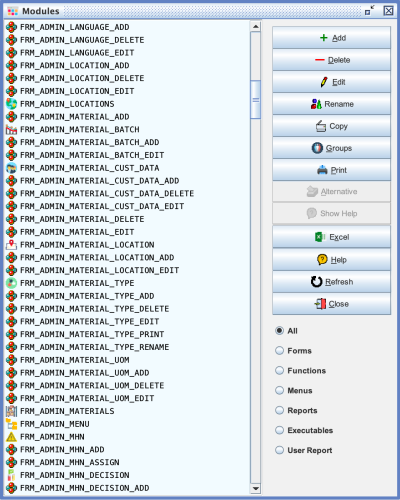
| Type | Description |
|---|---|
| Forms | Screens within the Desktop Application or page on the Web page of mobile device |
| Functions | Used to enable permissions such as Add, Edit, Delete within Forms |
| Menus | Defines a Menu which can have Forms or Reports Assigned to it. |
| Reports | Can be a regular report which you can view on screen or a Label which is for barcode labels. A Label module carries the printer settings (Group ID, Printer Type, Language, DPI and Direct Print) that decide which label printers are offered on the label screens. See Printer Queues. |
| Executables | Link to External program |
| User Report | Used to allow customisation on the reporting and labelling system |