Main Page
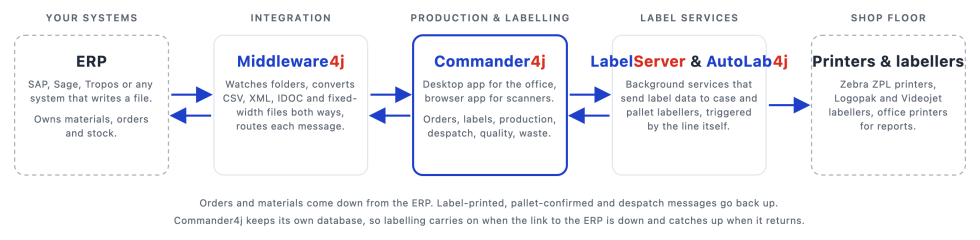
Commander4j and its companion applications bridge the gap between your ERP system and factory-floor labelling.
Orders and materials come down from the ERP. Operators print GS1 / SSCC pallet and case labels and record what was made. Production and despatch data go back up. Because Commander4j keeps its own database, labelling carries on when the link to head office is down and catches up when it returns.
New here? Start with the Install Guide and you will be logged in within the hour. Everything is free and open source (GPL v3).
Start here
| 1. Download Which installer file to pick for your PC. Downloads page |
2. Install Database, installer and Setup4j, step by step. Install Guide |
3. First login Default user, then set up your first materials and orders. First Login |
Already installed? Upgrading to a newer version. Upgrading |
| What is on a label, and how do I change it? Start with Label Layouts for a plain-language tour of the pallet label, then Changing a Label to make your first change in half an hour. | |||
The core suite
 Commander4j Production recording, pallet and case labelling, despatch, quality, waste and weight checks. The core application. |
 Middleware4j Converts and routes files between your ERP and Commander4j (CSV, XML, IDOC, fixed width). |
 LabelServer4j Background service that sends label data to case and secondary labellers. |
 AutoLab4j Automatic pallet labelling triggered by the production line (MODBUS). |
Tools and utilities
 ZPLRenderer Renders Zebra ZPL label commands on screen, from a file or over the network. Emulates a printer for testing. |
 LogoRenderer Renders Logopak label templates and emulates a Logopak labeller's TCP protocol for local testing. |
 LogoClient Companion to LogoRenderer for developing and testing solutions that talk to Logopak labellers. |
 SocketTest Emulate a TCP/IP client or server to test printers, labellers and other network devices. |
 ModbusBridge Relays values between a Modbus client and server, bridging communication between Modbus devices. |
 ModbusClient Connect to a Modbus server, then view and change register and coil values. |
 ModbusServer Run a Modbus server on your PC to simulate line equipment, then view and change its values. |
 SFTPTransfer Moves files automatically between a local folder and a remote SFTP server in both directions. |
 SFTPGet Watches a remote SFTP folder and moves each file that appears to a local folder. |
 SFTPSend Watches a local folder and moves each file that appears to a remote SFTP folder. |
 XMLViewer A simple viewer for XML documents, handy for checking interface messages. |
 Menu4j Tree-based menu for organising and launching applications and command-line scripts from a single XML file. |
 TreeDoc Creates plain-text documents that describe a folder structure. |
 LaunchPad A replacement for the Launchpad application that Apple removed in macOS 26. |