Template:Menu Applications
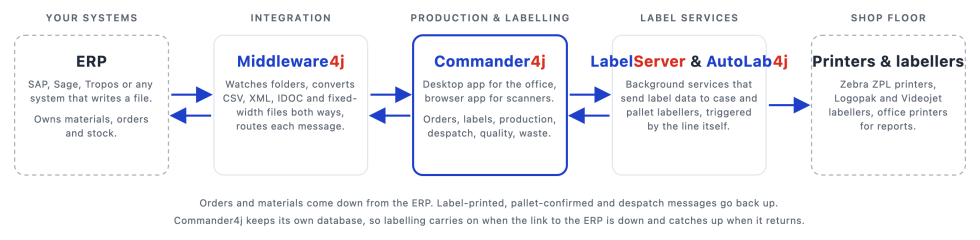
Commander4j and its companion applications bridge the gap between your ERP system and factory-floor labelling.
Orders and materials come down from the ERP. Operators print GS1 / SSCC pallet and case labels and record what was made. Production and despatch data go back up. Because Commander4j keeps its own database, labelling carries on when the link to head office is down and catches up when it returns.
New here? Start with the Install Guide and you will be logged in within the hour. Everything is free and open source (GPL v3).
Start here
| 1. Download Which installer file to pick for your PC. Downloads page |
2. Install Database, installer and Setup4j, step by step. Install Guide |
3. First login Default user, then set up your first materials and orders. First Login |
Already installed? Upgrading to a newer version. Upgrading |
The core suite
 Commander4j Production recording, pallet and case labelling, despatch, quality, waste and weight checks. The core application. |
 Middleware4j Converts and routes files between your ERP and Commander4j (CSV, XML, IDOC, fixed width). |
 LabelServer4j Background service that sends label data to case and secondary labellers. |
 AutoLab4j Automatic pallet labelling triggered by the production line (MODBUS). |
Tools and utilities
|

|

|
| |||
|
|
|
| |||
|
|
|

| |||
|

|