Zebra ZPL Label: Difference between revisions
Created page with "In the code below you will find a mix of standard Zebra ZPL Printer Commands and Commander4j specific instruction, plus some comments. For information on the ZPL commands see the Useful Information page. There is a list of commands which can be included in the Label Template Syntax document <span style="color:#FFFFFF; background:#ff0000">Pallet Label - Zebra - ZPL - 300dpi</span> DEFINE BARCODE BARCODE1 02<PADLEFT(<*EAN*>,14,0)>20<PADLEFT(<*VARIANT*>,2,0)>1..." |
Updated by push_wiki.py |
||
| (4 intermediate revisions by the same user not shown) | |||
| Line 1: | Line 1: | ||
'''Zebra ZPL Label''' is the standard pallet label that ships with Commander4j, shown first as it prints and then as the template that produces it. The template is the file <code>zebra_300dpi_pallet_label_a5_standard.lbl</code> in the <code>labels</code> folder. If you want to change it, [[Changing a Label]] takes you through the steps; this page explains what each block does. | |||
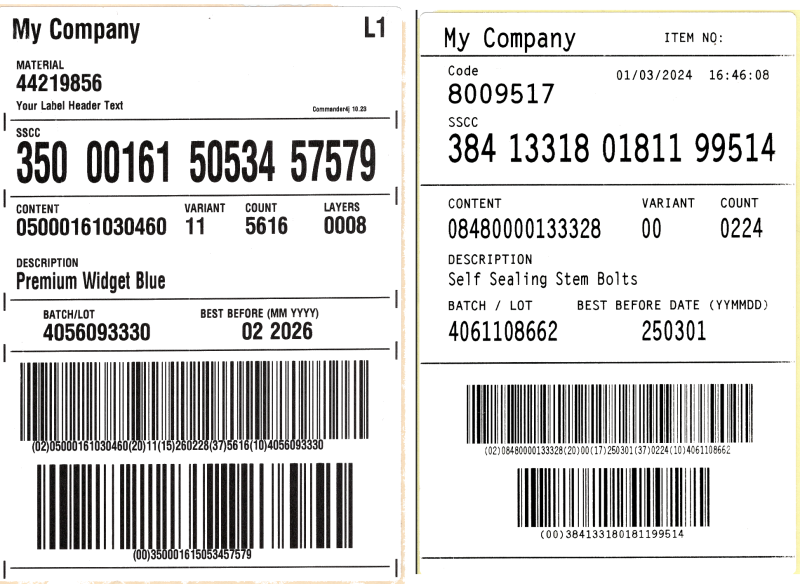
The label on the left below was printed from this template on a 300 dpi Zebra printer. The one on the right is the [[Intermec IPL Label|Intermec equivalent]]. | |||
<span style="color:#FFFFFF; background:# | [[file:Zebra_Intermec_Pallet.png|link=|800px]] | ||
== The template block by block == | |||
The template is divided into blocks by comment lines (<code>/* ... */</code>). The table follows the file from top to bottom. Positions are in printer dots from the top-left corner; at 300 dpi there are about 12 dots to a millimetre. | |||
{| class="wikitable" | |||
! Block !! What it prints !! Notes for anyone editing it | |||
|- | |||
| DEFINE BARCODE lines || Nothing directly. They build the two barcode values and declare the code-set switching characters. || Leave alone unless you are changing what the barcodes contain. Explained in [[Label Template Syntax]]. | |||
|- | |||
| Label initialisation || <code>^XA</code> starts the label, <code>^LT0060</code> shifts the whole label down slightly, <code>^PW1800</code> sets the print width to 1800 dots (6 inches at 300 dpi). || Change <code>^PW</code> if your label stock is a different width. | |||
|- | |||
| Heading || The customer name top left (<code><nowiki><*CUSTOMER_NAME*></nowiki></code>) and the label number top right (L1, L2). || To print a fixed company name instead, replace the placeholder with the text. | |||
|- | |||
| Product codes || The caption MATERIAL and the product code underneath. || The caption is plain text after <code>^FD</code> and can be changed to anything. | |||
|- | |||
| MAFF statement || The optional header text (<code><nowiki><*HEADER_COMMENT*></nowiki></code>) from the LABEL_HEADER_COMMENT system key. || Blank if the header text box on the screen is unticked. | |||
|- | |||
| Printed by || "Commander4j" and the version number in small type. || Can be removed. | |||
|- | |||
| Horizontal bar and sight lines || A rule across the label with short vertical marks at each end. This block repeats between sections. || <code>^GB</code> draws boxes and lines. The last number is the line thickness. | |||
|- | |||
| Pallet number SSCC || The caption SSCC and the 18-digit number in large type, split into four groups with SUBSTRING so it is easy to read. || The groups are 3, 5, 5 and 5 digits. Keep them if your customers read the number by eye. | |||
|- | |||
| Content, EAN, variant, quantity and layers || Four captions and the GTIN (padded to 14 digits), variant, case count and layer count. || A line that starts with <code>/*</code> inside this block is a disabled command, kept for reference. | |||
|- | |||
| Product description || The caption DESCRIPTION and the description text. || Long descriptions can run off the label. Reduce the font width (the second number after <code>^A0N,</code>) if they do. | |||
|- | |||
| Batch and best before || Captions BATCH/LOT and BEST BEFORE (MM YYYY), then the batch number and the expiry month and year. || The expiry format is set by the EXPIRYDATE function. <code><nowiki><EXPIRYDATE(dd/MM/yyyy)></nowiki></code> prints a full date. | |||
|- | |||
| Top barcode || The GS1-128 barcode for content, variant, best before, count and batch, with the human-readable text underneath in brackets. || <code>^BCN,350</code> sets the barcode height to 350 dots. The text line underneath must match what is in the barcode. | |||
|- | |||
| Bottom barcode || The GS1-128 barcode for the SSCC alone, with (00) and the number underneath. || This is the barcode most customers scan. Do not reduce its size without checking with them. | |||
|- | |||
| End of label || <code>^XZ</code> ends the label. The lines after it are part of the original design and print nothing. || Leave as is. | |||
|} | |||
== The complete template == | |||
In the code below you will find a mix of standard Zebra ZPL printer commands and Commander4j specific instructions, plus some comments. For information on the ZPL commands see the [[Useful Information]] page. The Commander4j instructions are described in [[Label Template Syntax]] and the placeholders in [[Label Fields]]. | |||
<span style="color:#FFFFFF; background:#1E8449">Pallet Label - Zebra - ZPL - 300dpi</span> | |||
DEFINE BARCODE BARCODE1 02<PADLEFT(<*EAN*>,14,0)>20<PADLEFT(<*VARIANT*>,2,0)>15<EXPIRYDATE(yy)><EXPIRYDATE(MM)> <EXPIRYDATE(dd)>37<*QUANTITY^0000*>^10<*BATCH_NUMBER*> | DEFINE BARCODE BARCODE1 02<PADLEFT(<*EAN*>,14,0)>20<PADLEFT(<*VARIANT*>,2,0)>15<EXPIRYDATE(yy)><EXPIRYDATE(MM)> <EXPIRYDATE(dd)>37<*QUANTITY^0000*>^10<*BATCH_NUMBER*> | ||
| Line 17: | Line 59: | ||
^XA^LT0060^XZ^XA | ^XA^LT0060^XZ^XA | ||
^PW1800 | ^PW1800 | ||
/* =====================================LABEL | /* =====================================LABEL 1=========================================================================== */ | ||
/* Heading for Label 1 */ | /* Heading for Label 1 */ | ||
| Line 114: | Line 156: | ||
^FO1770,2420^GB0,80,9^FS | ^FO1770,2420^GB0,80,9^FS | ||
^FO55,2450^GB1690,0,6^FS | ^FO55,2450^GB1690,0,6^FS | ||
^XZ | ^XZ | ||
/* End of Label */ | /* End of Label */ | ||
^XA^LT0060^XZ^XA | ^XA^LT0060^XZ^XA | ||
/* End of Label */ | /* End of Label */ | ||
== See also == | |||
* [[Label Layouts]] | |||
* [[Changing a Label]] | |||
* [[Label Fields]] | |||
* [[Label Template Syntax]] | |||
* [[Intermec IPL Label]] | |||
* [[ZPLRenderer|ZPL Renderer]] | |||
[[Category:Commander4j]] | |||
[[Category:LabelServer4j]] | |||
[[Category:AutoLab4j]] | |||
Latest revision as of 10:03, 15 October 2026
Zebra ZPL Label is the standard pallet label that ships with Commander4j, shown first as it prints and then as the template that produces it. The template is the file zebra_300dpi_pallet_label_a5_standard.lbl in the labels folder. If you want to change it, Changing a Label takes you through the steps; this page explains what each block does.
The label on the left below was printed from this template on a 300 dpi Zebra printer. The one on the right is the Intermec equivalent.
The template block by block
The template is divided into blocks by comment lines (/* ... */). The table follows the file from top to bottom. Positions are in printer dots from the top-left corner; at 300 dpi there are about 12 dots to a millimetre.
| Block | What it prints | Notes for anyone editing it |
|---|---|---|
| DEFINE BARCODE lines | Nothing directly. They build the two barcode values and declare the code-set switching characters. | Leave alone unless you are changing what the barcodes contain. Explained in Label Template Syntax. |
| Label initialisation | ^XA starts the label, ^LT0060 shifts the whole label down slightly, ^PW1800 sets the print width to 1800 dots (6 inches at 300 dpi). |
Change ^PW if your label stock is a different width.
|
| Heading | The customer name top left (<*CUSTOMER_NAME*>) and the label number top right (L1, L2). |
To print a fixed company name instead, replace the placeholder with the text. |
| Product codes | The caption MATERIAL and the product code underneath. | The caption is plain text after ^FD and can be changed to anything.
|
| MAFF statement | The optional header text (<*HEADER_COMMENT*>) from the LABEL_HEADER_COMMENT system key. |
Blank if the header text box on the screen is unticked. |
| Printed by | "Commander4j" and the version number in small type. | Can be removed. |
| Horizontal bar and sight lines | A rule across the label with short vertical marks at each end. This block repeats between sections. | ^GB draws boxes and lines. The last number is the line thickness.
|
| Pallet number SSCC | The caption SSCC and the 18-digit number in large type, split into four groups with SUBSTRING so it is easy to read. | The groups are 3, 5, 5 and 5 digits. Keep them if your customers read the number by eye. |
| Content, EAN, variant, quantity and layers | Four captions and the GTIN (padded to 14 digits), variant, case count and layer count. | A line that starts with /* inside this block is a disabled command, kept for reference.
|
| Product description | The caption DESCRIPTION and the description text. | Long descriptions can run off the label. Reduce the font width (the second number after ^A0N,) if they do.
|
| Batch and best before | Captions BATCH/LOT and BEST BEFORE (MM YYYY), then the batch number and the expiry month and year. | The expiry format is set by the EXPIRYDATE function. <EXPIRYDATE(dd/MM/yyyy)> prints a full date.
|
| Top barcode | The GS1-128 barcode for content, variant, best before, count and batch, with the human-readable text underneath in brackets. | ^BCN,350 sets the barcode height to 350 dots. The text line underneath must match what is in the barcode.
|
| Bottom barcode | The GS1-128 barcode for the SSCC alone, with (00) and the number underneath. | This is the barcode most customers scan. Do not reduce its size without checking with them. |
| End of label | ^XZ ends the label. The lines after it are part of the original design and print nothing. |
Leave as is. |
The complete template
In the code below you will find a mix of standard Zebra ZPL printer commands and Commander4j specific instructions, plus some comments. For information on the ZPL commands see the Useful Information page. The Commander4j instructions are described in Label Template Syntax and the placeholders in Label Fields.
Pallet Label - Zebra - ZPL - 300dpi
DEFINE BARCODE BARCODE1   02<PADLEFT(<*EAN*>,14,0)>20<PADLEFT(<*VARIANT*>,2,0)>15<EXPIRYDATE(yy)><EXPIRYDATE(MM)> <EXPIRYDATE(dd)>37<*QUANTITY^0000*>^10<*BATCH_NUMBER*>
DEFINE BARCODE BARCODE2   00<*SSCC*>
DEFINE BARCODE FNC1       >8
DEFINE BARCODE CODEA      >9
DEFINE BARCODE CODEB      >6
DEFINE BARCODE CODEC      >;
DEFINE BARCODE END        *END*

/* Label initialisation  /*

^XA^LT0060^XZ^XA
^PW1800
/*  =====================================LABEL 1=========================================================================== */

/* Heading for Label 1 */

^FO60,0002^A0N,120,110^CI27^FH^FD<*CUSTOMER_NAME*>^FS

^FO1625,0002^A0N,120,110^CI27^FDL<*LABEL_NO*>^FS

/* CS3 and SAP Product Codes */

^FO80,0190^A0N,50,50^CI27^FDMATERIAL^FS

^FO80,0250^A0N,100,100^CI27^FD<*MATERIAL*>^FS

/* MAFF Statement */

^FO0080,0370^A0N,50,50^CI27^FH^FD<*HEADER_COMMENT*>^FS

/* Printed by xxxxxxxxxxxxxxxx * /

^FO1400,0400^A0N,30,30^CI27^FDCommander4j <VERSION()>^FS

/* Horizontal Bar and Sight Lines */

^FO25,0420^GB0,80,9^FS
^FO1770,0420^GB0,80,9^FS
^FO55,0450^GB1690,0,6^FS

/* Pallet Number SSCC */

^FO80,0490^A0N,50,50^CI27^FDSSCC^FS
^FO080,0550^A0N,240,160^CI27^FD<SUBSTRING(<*SSCC*>,1,3)>^FS
^FO390,0550^A0N,240,160^CI27^FD<SUBSTRING(<*SSCC*>,4,5)>^FS
^FO850,0550^A0N,240,160^CI27^FD<SUBSTRING(<*SSCC*>,9,5)>^FS
^FO1300,0550^A0N,240,160^CI27^FD<SUBSTRING(<*SSCC*>,14,5)>^FS

/* Horizontal Bar and Sight Lines */

^FO25,0760^GB0,80,9^FS
^FO1770,0760^GB0,80,9^FS
^FO55,0790^GB1690,0,6^FS

/* Content EAN Variant Quantity & Layers*/

^FO80,0830^A0N,50,50^CI27^FDCONTENT^FS
^FO830,0830^A0N,50,50^CI27^FDVARIANT^FS
^FO1100,0830^A0N,50,50^CI27^FDCOUNT^FS
^FO1450,0830^A0N,50,50^CI27^FDLAYERS^FS

^FO80,0890^A0N,100,100^CI27^FD<PADLEFT(<*EAN*>,14,0)>^FS

/* ^FO830,0890^A0N,100,100^CI27^FD/^FS
^FO830,0890^A0N,100,100^CI27^FD<PADLEFT(<*VARIANT*>,2,0)>^FS
^FO1100,0890^A0N,100,100^CI27^FD<*QUANTITY*>^FS
^FO1450,0890^A0N,100,100^CI27^FD<*LAYERS*>^FS

/* Product Description */

^FO80,1070^A0N,50,50^CI27^FDDESCRIPTION^FS
^FO080,1130^A0N,100,75^CI27^FH^FD<*DESCRIPTION*>^FS

/* Horizontal Bar and Sight Lines */

^FO25,1220^GB0,80,9^FS
^FO1770,1220^GB0,80,9^FS
^FO55,1250^GB1690,0,6^FS

/* Batch (Works Order) and Best Before End Date */

^FO200,1300^A0N,50,50^CI27^FDBATCH/LOT^FS

^FO900,1300^A0N,50,50^CI27^FDBEST BEFORE (MM YYYY)^FS

^FO200,1360^A0N,100,100^CI27^FD<*BATCH_NUMBER*>^FS
^FO1085,1360^A0N,100,100^CI27^FD<EXPIRYDATE(MM)> <EXPIRYDATE(yyyy)>^FS

/* Horizontal Bar and Sight Lines */

^FO25,1450^GB0,80,9^FS
^FO1770,1450^GB0,80,9^FS
^FO55,1480^GB1690,0,6^FS

/* Top Barcode */

^BY5,3.0^FO100,1533^BCN,350,N,N,Y,N^FR^FD<*BARCODE1*>^FS
^FO150,1886^A0N,56,52^CI27^FR^FD(02)<PADLEFT(<*EAN*>,14,0)>(20)<PADLEFT(<*VARIANT*>,2,0)>(15)<EXPIRYDATE(yy)> <EXPIRYDATE(MM)><EXPIRYDATE(dd)>(37)<*QUANTITY*>(10)<*BATCH_NUMBER*>^FS

/* Bottom Barcode */

^BY9,3.0^FO175,1990^BCN,380,N,N,Y,N^FR^FD<*BARCODE2*>^FS
^FO600,2373^A0N,56,52^CI27^FR^FD(00)<*SSCC*>^FS

/* Horizontal Bar and Sight Lines */

^FO25,2420^GB0,80,9^FS
^FO1770,2420^GB0,80,9^FS
^FO55,2450^GB1690,0,6^FS

^XZ

/* End of Label */

^XA^LT0060^XZ^XA

/* End of Label */